Understanding Docker


3 min read

In this blog, I am writing about the theory of DevOps and explaining how Docker is used everywhere as a core technology for building, running, and managing applications.
What is a Docker?
Docker is a containerization platform for developing, packaging, shipping, and running applications.
It provides the ability to run an application in an isolated environment called a container.
Makes deployment and development efficient.
Why we need Docker?
it solves a lot of problems that developers and DevOps teams face when running applications. Here’s why Docker is so widely used.
Runs the same on every machine (no "works on my laptop" issue).
Lightweight and faster than virtual machines.
Portable — run anywhere (local, server, cloud).
Easy to deploy and scale apps.
Keeps apps isolated so dependencies don’t clash.
In short: Docker = consistency + speed + isolation + scalability
Docker architecture
How does it work?
The idea behind a Docker container is that it is a self-contained unit of software that can move to and run on any server that is configured to run containers. It could be a laptop, an EC2 instance, or a bare-metal server in a private data center.
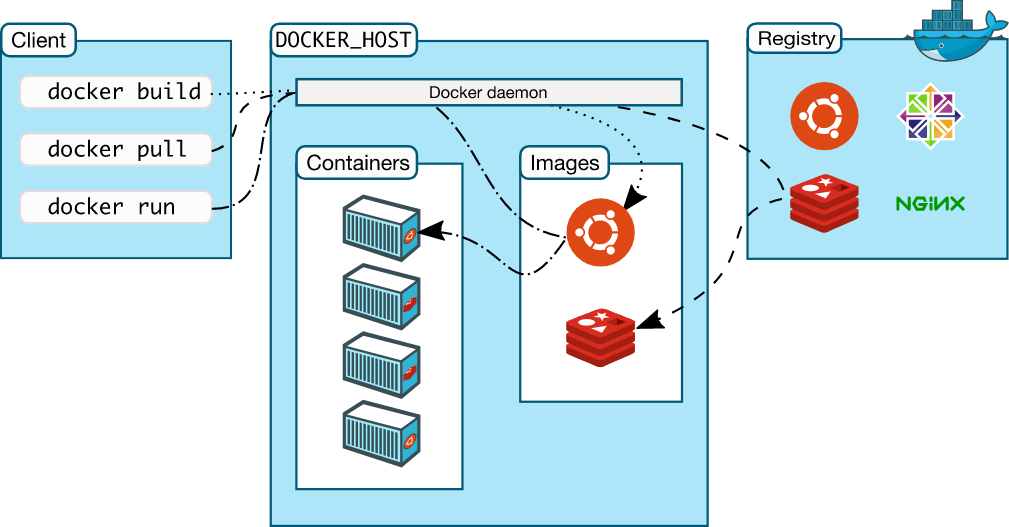
At the heart of Docker's architecture is the Docker daemon, which provides a layer that abstracts the OS specifics from the user while giving that user the ability to handle all aspects of the container's lifecycle (from build to install to run to clean up) in an easy-to-use and repeatable way. Containers have become very popular because of the benefits provided by this abstraction.
Regardless of whether Docker is being used on Linux or Windows, you can use the exact same commands to begin working with your application. The following image illustrates Docker's architecture
Docker vs Virtual Machines :
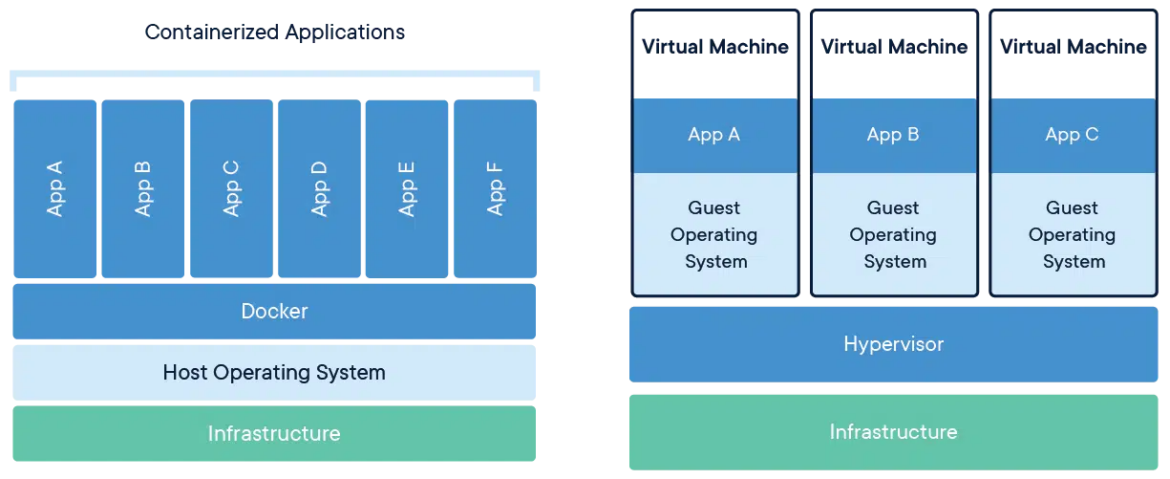
Virtualization also became popular due to its ability to isolate workloads, move them around, and only provide as many resources as they need. However, containers do this much more efficiently.
A virtual machine instance needs an entire operating system to be in place and running, which adds a lot of overhead and increases the number of variables that need to be managed between what a developer builds and what is running in production.
In contrast, a container only needs a single instance of an operating system in place so it can run more instances on the same servers. The following diagram shows the difference between running Docker containers and virtual machines:
Docker Component :
1. Docker Daemon (dockerd)
Runs on the host in the background.
Handles images, containers, networks, volumes.
Listens to API requests from clients.
Can talk to other daemons (e.g., in Docker Swarm).
2. Docker Client
Main interface (CLI).
Sends commands (
docker run,docker build,docker pull) to the daemon via REST API.One client can control multiple daemons.
3. Docker Host
The machine (physical/virtual) where Docker runs.
Includes OS + Docker Daemon + images + containers + networks + storage.
4. Docker Registry
Stores Docker images.
Public: Docker Hub (community & official images).
Private: e.g., AWS ECR, Harbor, GCP Artifact Registry.
Docker Object :
Docker Engine
The Docker Engine is the heart of the Docker platform. It has two main components:
Docker Daemon (dockerd): Runs on the host and manages images, containers, networks, and volumes.
Docker Client: A CLI tool that lets users interact with the daemon to build, run, stop, and manage containers.
Docker Images
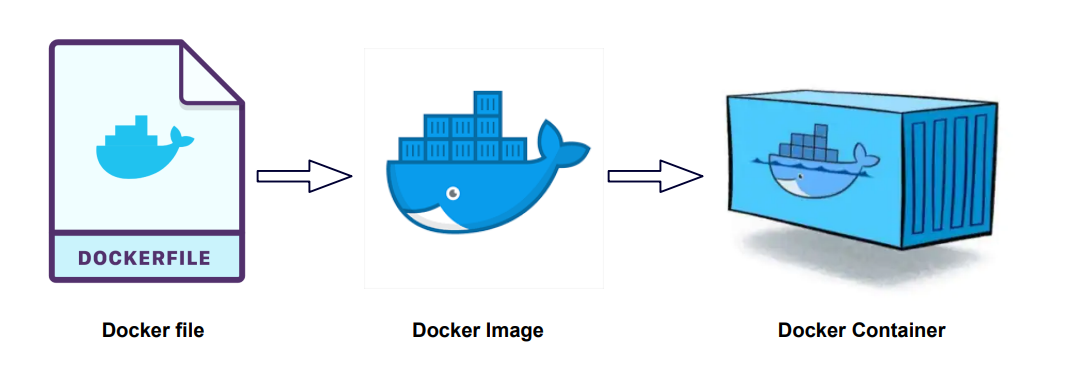
Docker images are read-only templates that include app code, runtime, libraries, and dependencies. They are built from Dockerfiles, layer by layer.
Docker Containers
Docker containers are runnable instances of images. They package the app and its dependencies in isolation, and can be created, started, stopped, moved, or deleted with Docker commands.
Refrences
https://www.geeksforgeeks.org/devops/architecture-of-docker/
https://docs.docker.com/get-started/docker-overview/
https://www.sysdig.com/learn-cloud-native/what-is-docker-architecture